Tech Geniuses
IT and Technical Solutions for Small and Mid-sized Businesses
Forget the Geeks, Call the Pros!
305.407.3523 e-mail at Support@TechGeniuses.com text TechGeniuses to 72727
How to check your version of Adobe Flash
To check your version of Adobe flash
1.
Go to
http://www.adobe.com/software/flash/about/
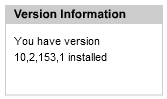
2. Your version will be displayed simiular to that shown on the right
3.
The most
current versions for your browser will be listed along
with a link to the “player Download Center”