
Tech Geniuses
IT and Technical Solutions for Small and Mid-sized Businesses
Forget the Geeks, Call the Pros!
305.407.3523 e-mail at Support@TechGeniuses.com text TechGeniuses to 72727
How to update your Apple MacBook Pro
Apple frequently releases software updates that you can download. The Software Update featuremakes it very easy to determine and get exactly what you need.
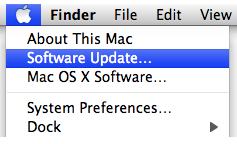
1.From the Apple () menu, choose Software Update.
2.Software Update checks for available updates. In the Software Update window,
select the items you want to install, then click Install. Usually, you should
install all available updates.
3.Enter an administrator account name and password.
4.After installation is complete, restart the computer if required.
Apple Support Page

